Stop wondering why your DynamoDB bill keeps growing
Dynasight uncovers hidden inefficiencies, architectural mistakes, and costly configuration issues before they become thousands in unnecessary AWS spend.
We can see the waste. We cannot see your data.
Dynasight connects through a least-privilege IAM role that is read-only at the infrastructure level and excludes every API used to read table items. Your customer records, application data, and values never leave DynamoDB.
No item-level reads
The role does not grant GetItem, BatchGetItem, Query, or Scan.
No writes or automatic changes
Dynasight cannot update tables, delete indexes, or write records.
You control the boundary
The IAM role lives in your AWS account and can be revoked whenever you choose.
- Table and index metadata
- Capacity and usage metrics
- Cost and performance signals
- DynamoDB item contents
- GetItem, BatchGetItem, Query, or Scan
- PutItem, UpdateTable, Delete*, or any write
Built for engineering teams running DynamoDB in production
Product
DynamoDB cost and performance signals, translated into action.
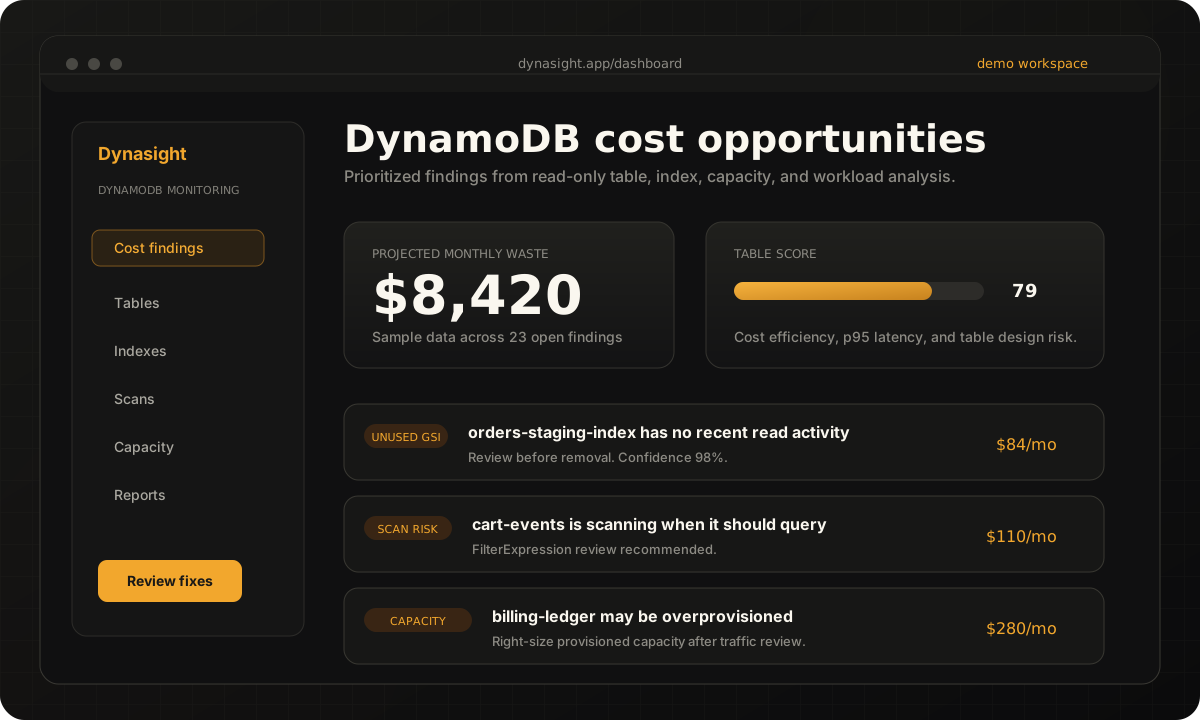
Dynasight analyzes tables, indexes, capacity, scans, and access patterns so engineers can see what is waste, what is risk, and what should be fixed first.
Cost optimization
Find DynamoDB waste from unused indexes, overprovisioned tables, and access patterns that read more than they should.
Performance monitoring
Monitor scan-heavy workloads, latency risk, and table behavior with DynamoDB-specific context.
Table design visibility
See where GSIs, keys, filters, and workload shape no longer match the application.
Prioritized fixes
Turn monitoring signals into a ranked backlog of cost-saving and performance-improving work.
Findings
The DynamoDB mistakes Dynasight is built to catch.
Expensive table detection
Find DynamoDB tables whose cost profile deserves engineering review.
Unused GSI detection
Spot unused or underused global secondary indexes before they keep adding cost.
Scan-heavy workload detection
Surface scans and FilterExpression misuse that may point to table design issues.
Overprovisioned capacity detection
Identify provisioned tables that may need right-sizing or capacity mode review.
Access pattern analysis
Connect inefficient queries, index fit, and table design mistakes.
Cost-saving recommendations
Prioritize fixes that can reduce DynamoDB waste without guessing.
How it works
From AWS connection to prioritized DynamoDB fixes.
Connect a read-only AWS role
Share metadata and metrics without item-level read or write permissions.
Analyze tables and indexes
Tables, GSIs, capacity, scans, and workload signals are reviewed together.
Detect waste and performance risk
Unused indexes, overprovisioned tables, and scan-heavy patterns are surfaced.
Prioritize fixes
Findings are ranked by impact, confidence, and engineering context.
Track improvements
Resolved findings stay visible so optimization work does not vanish.
Findings
Every finding explains the table, the risk, and the next review.
Dynasight does not stop at "unused GSI detected." Findings connect DynamoDB cost, performance, access patterns, and table design so engineers can decide what to fix first.
- Plain-English context for cost and performance risk
- Read-only analysis with no automatic AWS changes
- Confidence, impact, and review steps on every finding
- Share findings with the team and track what gets resolved
cart-events is scanning when it should query.
Running 1.2M Scan operations a day when the query pattern could be served by a GSI on session_id. A targeted query path may reduce unnecessary reads and lower latency once the team verifies the table design.
Reviewing traffic pattern
Comparing 1.2M scan calls against weekly read paths.
Preparing index review
Checking whether a targeted query path would reduce table work.
Updating projected savings ledger
Recording the sample impact after the finding is marked resolved.
Finding archived as resolved
8s ago
Projected waste
$110/mo
Latency signal
Review
Table score
98
Use cases
Built for practical DynamoDB cost management.
Dynasight gives engineering teams a focused way to inspect DynamoDB-specific cost and performance issues without turning the homepage into an operations manual.
Cloud cost reviews
Give engineering teams a DynamoDB cost analyzer that explains why spend changed and which tables deserve review.
Read-only production audits
Inspect table metadata and workload signals without exposing item contents or granting write access.
Optimization backlog planning
Turn unused GSIs, scan-heavy workloads, and overprovisioned tables into a clear technical backlog.
Pricing
Pricing that scales with your DynamoDB footprint.
Start with table-level visibility, then expand monitoring as more teams rely on Dynasight for DynamoDB cost optimization.
- 3 tables monitored
- 1 scan per day
- 10 manual scans per month
- Email alerts
- Core findings & Savings Ledger
- 25 tables monitored
- Twice-Daily scans
- 30 manual scans per month
- 1 seat included
- Slack & Email alerts
- Weekly email digests
- Unlimited tables
- Hourly scans across all regions
- 5 team members included
- Slack + email alerts
- Executive cost/performance reports
FAQ
DynamoDB optimization questions.
Answers for teams evaluating DynamoDB cost optimization, monitoring, unused GSI detection, scan-heavy workloads, and read-only AWS access.
What is Dynasight?
Dynasight is a DynamoDB monitoring and optimization platform for engineering teams. It connects through a least-privilege AWS IAM role, analyzes table metadata and operational metrics without accessing item contents, and turns cost and performance signals into prioritized engineering actions.
How does Dynasight help reduce DynamoDB costs?
Dynasight helps reduce DynamoDB costs by surfacing expensive tables, unused GSIs, overprovisioned capacity, scan-heavy workloads, and inefficient access patterns. Each finding explains the likely waste, the risk, and the next fix to consider.
What is DynamoDB cost optimization?
DynamoDB cost optimization is the process of reducing unnecessary DynamoDB spend without hurting production performance. Common opportunities include right-sizing provisioned capacity, removing unused indexes, reducing scans, and improving table access patterns.
Is Dynasight a DynamoDB monitoring tool?
Yes. Dynasight is a DynamoDB monitoring tool built around table health, cost efficiency, performance risk, and operational fixes rather than generic cloud dashboards.
How does Dynasight find unused GSIs?
Dynasight analyzes index activity and table context to identify unused or underused global secondary indexes. Those unused GSIs can continue adding storage and write costs even when application traffic no longer depends on them.
Can Dynasight help detect scan-heavy DynamoDB workloads?
Yes. Dynasight highlights scan-heavy workloads and FilterExpression misuse so teams can see where reads may be doing more work than necessary. It helps connect those patterns to DynamoDB cost, latency, and access pattern fixes.
How is Dynasight different from AWS Cost Explorer?
AWS Cost Explorer shows DynamoDB spend trends. Dynasight goes deeper by tying that spend to table-level causes such as unused indexes, overprovisioned tables, scan-heavy workloads, and specific engineering actions.
How is Dynasight different from CloudWatch?
CloudWatch exposes DynamoDB metrics and alarms. Dynasight interprets DynamoDB cost and performance signals together so engineering teams can prioritize fixes instead of manually stitching metrics into a remediation backlog.
Who should use Dynasight?
Dynasight is built for SaaS teams, platform engineers, cloud engineers, serverless teams, and AWS-focused organizations that run DynamoDB in production and want clearer cost management and performance visibility.
Can Dynasight read the data inside my DynamoDB tables?
No. The Dynasight IAM role does not grant item-level read actions such as GetItem, BatchGetItem, Query, or Scan. Dynasight analyzes table and index metadata, capacity, usage metrics, and cost signals without accessing your customer records or application data.
Does Dynasight make changes to my AWS account automatically?
No. Dynasight has no AWS write permissions. It can recommend fixes and provide remediation context, but it cannot change your DynamoDB tables, records, indexes, or AWS account.

Start finding DynamoDB waste before it scales.
Connect a read-only AWS role, review prioritized findings, and give your team a clearer path to DynamoDB cost and performance fixes.
Metadata only · No item reads · No AWS writes